|
|
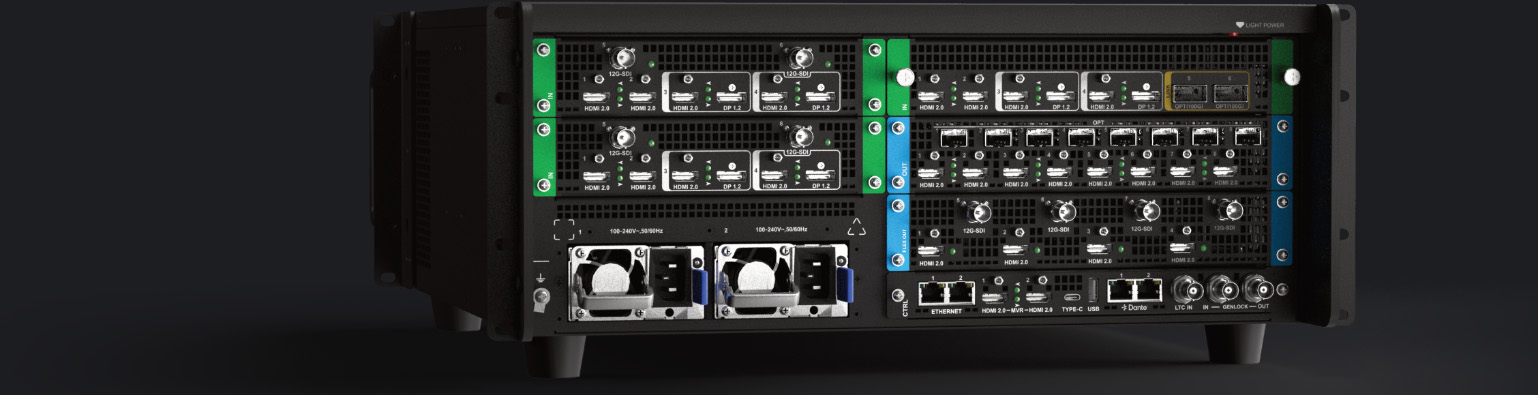
• 12x fixed 4K concurrent inputs:

◦ 4x HDMI 2.0

◦ 4x HDMI 2.0/DP1.2 (Only one type of connector can be selected as the input source at the same time.)

◦ 4x 12G - SDI

• HDMI 2.0:

◦ Maximum resolution: 4096×2160@60Hz 8bit 4:4:4

◦ Maximum width: 8192 pixels (8192×1080@60Hz)

◦ Maximum height: 7680 pixels (1080×7680@60Hz)

◦ Dynamic range: HDR10/HLG/SDR

◦ Quantization range: Full/Limited

◦ EDID management (support for standard resolutions and custom resolutions)

◦ HDCP 2.2 and HDCP 1.4 compliant

◦ No support for interlaced video signal

◦ Support for 8 - channel embedded audio (24bit/48kHz)

• DP 1.2:

◦ Maximum resolution: 4096×2160@60Hz 10bit 4:4:4

◦ Maximum width: 8192 pixels (8192×1080@60Hz)

◦ Maximum height: 7680 pixels (1080×7680@60Hz)

◦ Dynamic range: HDR10/HLG/SDR

◦ Quantization range: Full/Limited

◦ EDID management (support for standard resolutions and custom resolutions)

◦ HDCP 2.2 and HDCP 1.3 compliant

◦ No support for interlaced video signal

◦ Support for 8 - channel embedded audio (24bit/48kHz)

• 12G - SDI:

◦ Support for ST - 2082 (12G), ST - 2081 (6G), ST - 424 (3G), ST - 292 (HD), and ST - 259 (SD) video inputs

◦ Compatible with SD - SDI, HD - SDI, 3G - SDI and 6G - SDI

◦ Maximum resolution: 4096×2160@60Hz 10bit 4:2:2

◦ Support for interlaced video signal

◦ Support for 8 - channel embedded audio (24bit/48kHz)
|
|
|
• 8x HDMI 2.0 main output connectors

◦ Up to 4x 4K concurrent main outputs in copy mode

◦ Up to 8x DL concurrent main outputs in split mode

• 8x 10G SFP optical ports are offered to copy the HDMI 2.0 outputs.

• HDMI 2.0:

◦ Maximum resolution: 4096×2160@60Hz 8bit 4:4:4

◦ Maximum width: 8192 pixels (8192×1080@60Hz)

◦ Maximum height: 7680 pixels (1080×7680@60Hz)

◦ Bit depth: 8bit/10bit/12bit

◦ Color space: YCbCr/RGB

◦ Dynamic range: HDR10/HLG/SDR

◦ EDID management (support for standard resolutions and custom resolutions)

◦ HDCP 2.2 and HDCP 1.4 compliant

◦ Support for interlaced video signal

◦ Support for 8 - channel embedded audio (24bit/48kHz)
|
|
|
• 4x HDMI 2.0 flex output connectors

• Configurable as independent screens or edge - blended widescreens with support for Multiviewer, transition effects such as fade, test patterns, AOl, virtual pixels, etc.

• Up to 4x 4K mixing PIP layers and 4x still BKG with support for adjustment of layer position, size and Z - order, layer effects including flip, crop and mask, layer color adjustment, and layer presets.

• Auxiliary devices such as teleprompters also can be connected.

• HDMI 2.0:

◦ Maximum resolution: 4096×2160@60Hz 8bit 4:4:4

◦ Maximum width: 8192 pixels (8192×1080@60Hz)

◦ Maximum height: 7680 pixels (1080×7680@60Hz)

◦ Bit depth: 8bit/10bit/12bit

◦ Color space: YCbCr/RGB

◦ Dynamic range: HDR10/HLG/SDR

◦ EDID management (support for standard resolutions and custom resolutions)

◦ HDCP 2.2 and HDCP 1.4 compliant

◦ Support for interlaced video signal

◦ Support for 8 - channel embedded audio (24bit/48kHz)
|
|
|
• 4x 12G - SDI matrix for mapping any content from the input sources, MVR, PGM and flex outputs to the output

• 12G - SDI

◦ Compatible with HD - SDI, 3G - SDI and 6G - SDI

◦ No support for bit depth and color space settings

◦ Support for 8 - channel embedded audio (24bit/48kHz)
|
|
|
• Dual redundancy Gigabit Ethernet ports (AES67 compliant)

• Audio de - embedding/embedding on every input & output (raw audio)

• De - embedded audio channels can be routed directly to the Dante network

• Audio channels from external Dante audio processor can be re - embedded for sending to display, streaming or recording device

• 64×64 Dante channels @48 kHz
|
|
|
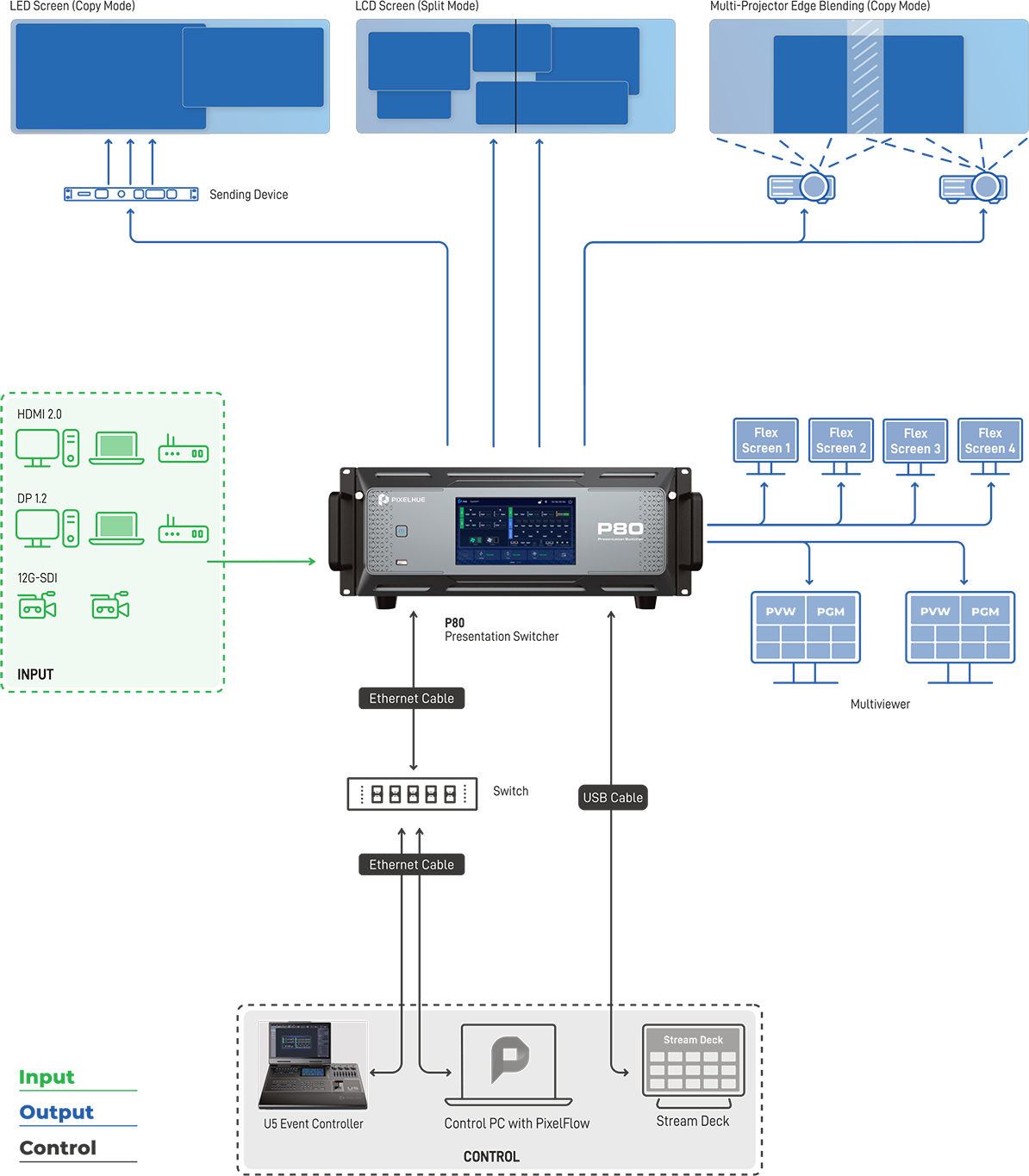
• 2x HDMI 2.0 for connecting to Multiviewer screens to monitor all the input sources, PVW and PGM.

• Allows users to select independent or copy mode and select a standard resolution and frame rate for the connectors.

◦ In independent mode, 2x concurrent DL outputs are supported.

◦ In copy mode, 1x 4K output and 1x copying output are supported.

• A variety of Multiviewer layout templates are provided and custom layout is supported.

• The Multiviewer windows can be resized and repositioned, and the width, height and color of the border can be adjusted.

• Intuitive and upgraded MVR interaction, including maintaining source aspect ratio, snapping between canvas and MVR window, adjusting background color, and customizing UMD color, display content, and font settings, as well as canvas scaling
|
|
|
• 2x Gigabit Ethernet ports used for control and input view

• One works as primary and the other as backup.

• Two Ethernet ports share the same IP address.
|
|
|
• Genlock synchronization signal input

• Genlock synchronization signal output (with support for loop-through)
|
|
|
• Output connectors can be freely configured as independent screens or edge - blended widescreens.

• Up to 4x 4K main screens and 4x flex screens are supported.

• Multi - screen mosaic

• Users can arrange the mosaic layout manually or select a layout template. If a connector used for mosaic fails, it can be replaced with another normal connector in the software.

• Edge blending and LCD bezel compensation

• Virtual pixel configuration is supported, simplifying calculations between on - site screen size and P80 - loaded screen pixels.

• AOI (Area of Interest) feature to customize active areas of outputs

• Custom test patterns
|
|
|
• Up to 8x 4K mixing main layers are supported.

• Any of the inputs, Multiviewer, PGM, or local images can be selected as the source of a layer.

• Layers can be repositioned and resized.

• The Z - order of layers can be adjusted.

• Layer names are displayed and can be modified.

• Layer resource usage are displayed in real time.

• Layer effects: DSK, mask, crop, flip, cut & fill, border, shadow and more

• Layer presets: All (or a portion) of the current layer's properties (such as input source, position, size, effects, etc.) can be saved as a layer preset in PixelFlow for easy recall. Up to 256 layer presets can be saved.
|
|
|
• Up to 256 presets can be saved for easy recall.

• Relative and complete presets are supported to satisfy more application requirements.

• Allows users to select preferred parameters such as transition duration and input source to save to a preset.

• Presets can be loaded to PVW or PGM.
|
|
|
• Images imported from the control computer or event controller can be used as BKG.

• Images captured from input sources and PGM can be used as BKG.

• One dedicated still BKG image available on each PGM output. Up to 4 still BKG supported.

• BKG can be turned on or off.

• The BKG image can be changed and deleted.

• The BKG storage capacity is up to 1 GB and PNG/BMP/JPG/JPEG files are supported.

• The BKG image automatically scales to fit the screen while maintaining aspect ratio and is positioned at the bottom layer by default.
|
|
|
• Seamless transition from PVW to PGM via Take, Cut or T - bar

• Two options for transition between PVW and PGM: Copy and Swap

• Customizable transition duration (0.1s to 10s)

• Fade in and out supported

• Screen freeze and FTB (Fade to Black) supported
|
PixelFlow Software Functionalities
|
• Long - term stable running

• Upgraded and visualized UI, adaptive to U5/U5 Pro/PC screens

• One click to change skins of U5/U5 Pro buttons

• Software parameter controllable by U5/U5 Pro encoders or faders

• Distinct function areas and hover menu for ease of use

• Fully functional simulator for offline configuration and practice
|
|
|
• FPGA - based high - performance image enhancement architecture

• Ultra - low latency, as low as 1 frame in proper configuration

• BT.601, BT.709, BT.2020, DCI - P3 color space processing support

• Free conversion between SDR, HDR10 and HLG

• Advanced DSK capability: smart key, chroma key and luma key

• Compatible with HDCP 1.3, HDCP 1.4 and HDCP 2.2
|